F136 - tech blog
A simple blog in the complex world of healthcare telematics.
Visit us:
Software Factory 2.0: Evolution, Security, and Scaling at gematik
by Christian Lange, reading time:
8 mins
It has been some time since I published the initial article on the Software Factory alongside my colleague Michele Adduci. However, that does not mean development has stood still. We are continuously expanding our platform, recently introducing advanced security tools like Dependency Track and Snyk, while evaluating numerous new approaches.
 Fig.1: Logo of Software Factory @gematik (gematik GmbH)
In this article, I want to highlight how the Software Factory (SWF) has transformed and the massive value that standardization through our Jenkins Shared Library (JSL) brings to our daily work.
Focus: Supply Chain Security & Advanced Scanning
Securing the software supply chain is now a top priority at gematik. We have firmly integrated the creation of Software Bill of Materials (SBOM)—specifically using the CycloneDX standard into our build process. Furthermore, we utilize Cosign for Docker image signatures and attestations, ensuring every module remains transparent and verifiable.
 Fig.2: Software supply chain security workflow
New Players in the Security Stack: Snyk and Dependency Track
To detect vulnerabilities even earlier and more precisely, we have added two core components:
- Snyk (SAST & SCA): Snyk allows us to perform Static Application Security Testing (SAST) and detect flaws in dependencies during development. Unlike general code quality tools like SonarQube, Snyk features a specialized engine focused strictly on security. We have integrated Snyk results directly into GitLab Merge Requests, providing developers and reviewers with immediate feedback on the security posture of their changes.
- Dependency Track & VEX: Integrated into every branch and merge request, Dependency Track manages our projects by analyzing SBOMs. A key addition is our handling of partner components: we now require partners to provide SBOMs accompanied by VEX (Vulnerability Exploitability eXchange) documents. This allows us to assess vulnerabilities effectively and receive early alerts if new risks emerge in third-party software.
Crucially, this security-first approach is strictly enforced: any critical findings from SonarQube, Dependency Track, or Trivy immediately fail the pipeline. Furthermore, Snyk acts as a hard block, preventing GitLab Merge Requests from being merged until all identified security findings are resolved.
Jenkins Shared Library (JSL)
Standardization is the only way to scale for our developers and testers. Our Jenkins Shared Library now comprises over 350 functions, providing a consistent interface for complex tasks.
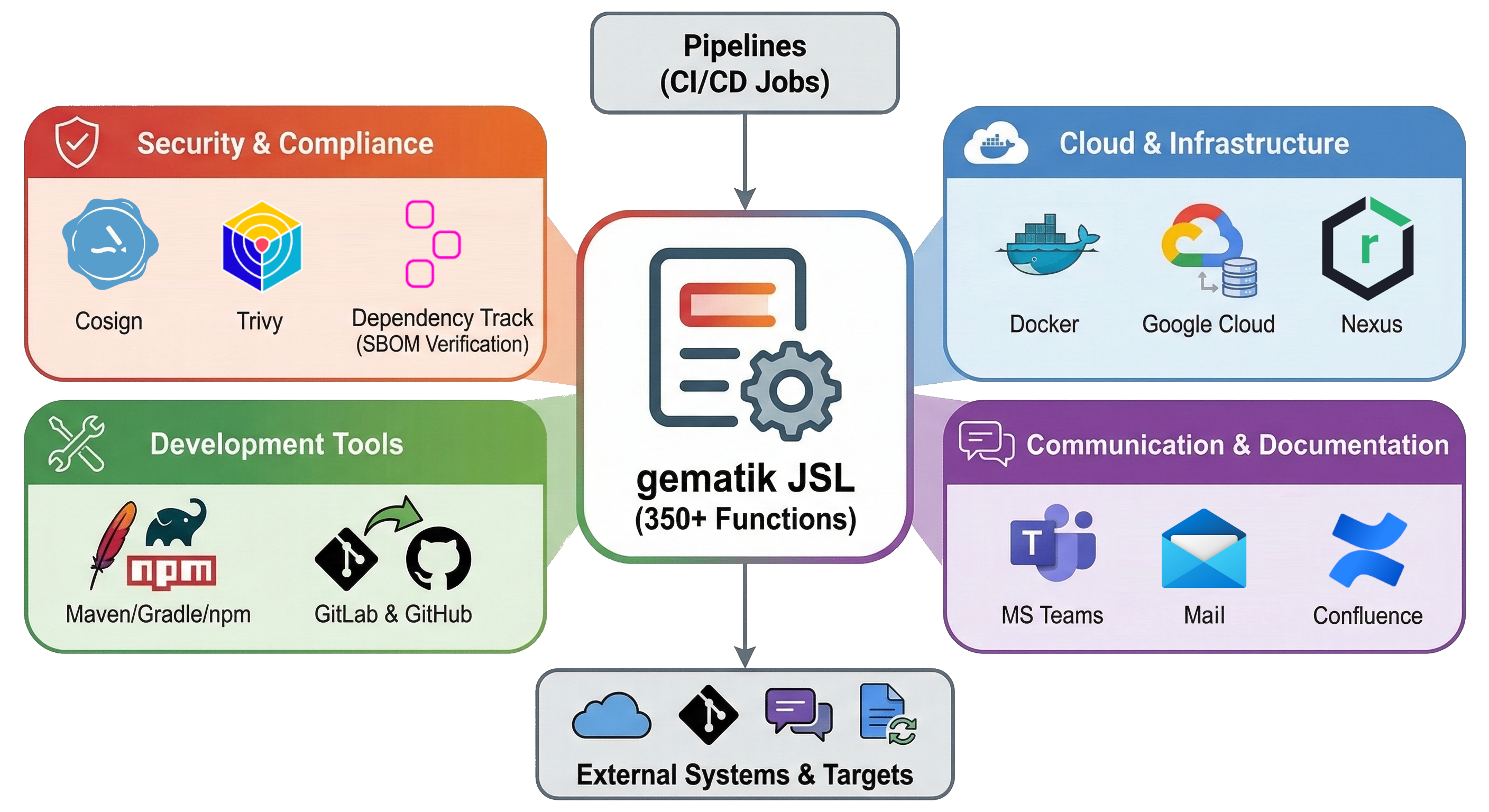 Fig.3: Jenkins Shared Library clusters
The functions are organized into specialized clusters:
- Security & Compliance: Cosign methods for signatures/attestations; Trivy for artifact and configuration scans.
- Vulnerability Management: Dependency Track methods for project lifecycle and SBOM verification.
- Infrastructure & Cloud: Docker (images, SBOMs, compose, tests), Google Cloud (buckets, secrets), and Nexus integration.
- Development Tools: Standardized builds for Maven, Gradle, and npm; automated GitLab releases and Merge Requests.
- Communication & Documentation: MS Teams notifications and automated Confluence documentation updates.
We currently manage approximately 1,900 pipeline jobs (30% CI, 70% CD/Release). Without the JSL, redundant errors would be frequent, and simple API changes would require manual updates across thousands of pipelines.
Practical Success Stories
1. Resilience Against API Changes (MS Teams)
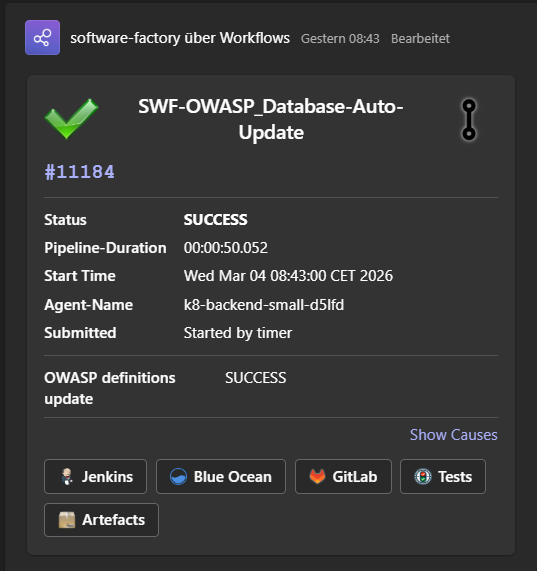
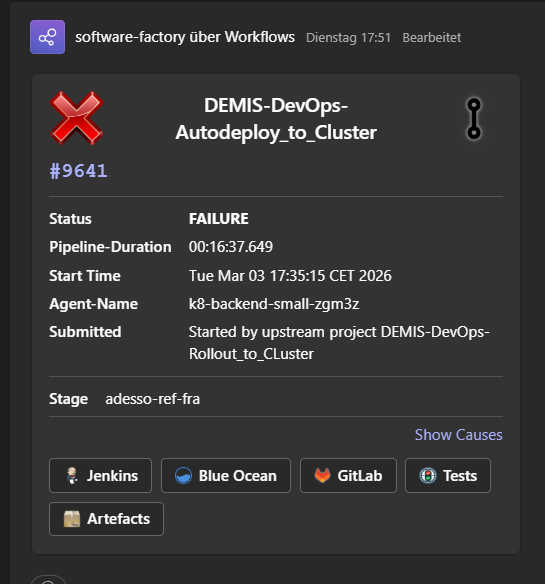
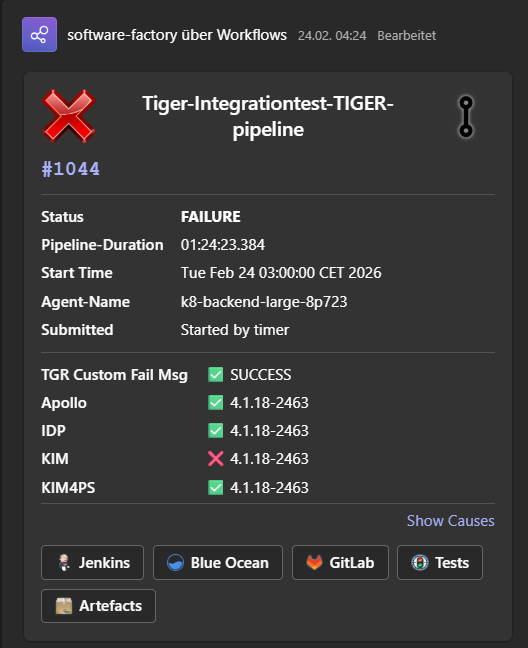
When Microsoft retired the Office 365 connectors in 2025, it caused major disruptions. By utilizing our JSL method teamsSendNotificationToChannel(channelId, groupId), we updated the logic in one central place. All teams immediately regained their rich notifications without touching a single line of their own pipeline code.
As seen in the examples below, our standard notifications provide comprehensive information about the executed pipeline. An icon in the right corner instantly shows whether it was a Merge Request, a main branch, or a feature branch build. The cards clearly display the build’s success or failure state along with the root cause that triggered the pipeline. Moreover, the notifications contain direct quick links to essential resources: Jenkins and Blue Ocean for pipeline views, GitLab for code and MRs, test reports, and a direct link to the published artifacts.
Beyond the defaults, teams can smoothly inject additional context using a simple HashMap via the same JSL call to represent specific data from other pipeline steps. Similar JSL methods are also available for other services like Google Chat, and teams are fully empowered to use custom templates to define entirely bespoke message formats.
2. “Open by Default” Through Automated Synchronization
In many projects, we work internally on gematik’s own GitLab instance. However, collaboration with the community, users, and software vendors is of utmost importance to us, meaning many of our projects are made publicly available. We are strongly committed to providing a vast amount of Open Source resources to the public. You can find our released artifacts and codebases on various platforms:
- Source Code: github.com/gematik
- Docker Images: DockerHub (gematik1)
- Java Libraries: Maven Central (de.gematik)
Often, these projects are initially developed internally before being released to the public. To seamlessly synchronize our internal and external codebases, the JSL provides ready-to-use pipelines. Teams only need to configure a few simple parameters in their own projects to utilize this automation. Here is an example of the configuration required for a synchronization to GitHub:
@Library('gematik-jenkins-shared-library')_
pipelineGitHubPublishSources {
    GITHUB_PROJECT_NAME = 'myGitHubProjectName'
    GEMATIK_PROJECT_NAME = 'myProjectGoupe/myService.git'
    REMOTE_BRANCH = 'main'
}
This ensures internal code meets all requirements (license headers, documentation) before being submitted as a Pull Request to GitHub.
Architecture: Scaling and Hybrid Connectivity
As illustrated in Figure 5, our core stack—including the Jenkins Master, GitLab Server, Nexus, and Artifact Registry—is securely distributed across the Google Cloud Platform (GCP). When a developer triggers a pipeline, the Jenkins Master dynamically provisions ephemeral build pods within our Kubernetes clusters. Depending on the specific workload, it allocates appropriately sized resource profiles (ranging from small to large pods) for both Linux and Windows environments.
 Fig.5: Software Factory Architecture
This elastic scaling allows us to efficiently manage parallel builds while optimizing resource consumption. To ensure reliability across this dynamic setup, we established OpenTelemetry for comprehensive monitoring and tracing.
Solving the Rate-Limit Challenge
With thousands of builds, we frequently encountered “Rate Limit” issues where external database endpoints would block our IPs due to high request volumes. To solve this, we operate our own caching servers for Trivy and OWASP within our cluster. This ensures that our security scans are never delayed by external service outages or throttled connections.
Hybrid Setup: Mac OS and TI-Testnets
While Linux and Windows agents scale dynamically in GCP, we maintain our own macOS hardware in our on-premise data center for mobile development, such as the E-Rezept App.
Furthermore, for deployments into the Telematik-Infrastruktur (TI) testnets, the highly secured backbone of the German digital healthcare system, we utilize a specialized approach: Jenkins starts agents directly on Docker hosts within the target test network. This avoids complex tunneling; the agent executes the deployment locally on the target system, ensuring higher security and reliability during the deployment phase.
The Next Steps
The Software Factory is a living organism. Our upcoming milestones include:
- Project-Based Access Control: We are currently introducing RBAC across all SWF services via a project-based approach supported by Workload Identity Federation.
- JSL Version 2: We are currently refactoring the JSL into an object-oriented approach. The rollout is planned for later this year.
- Inbound Security: To harden our environment against malicious third-party components, we will integrate the Sonatype Repository Firewall this year.
By centralizing these complex infrastructure tasks, we allow our teams to focus on what truly matters: building excellent software for the German healthcare system.
About The Author
Christian Lange is a software architect with more than 15 years of expertise and leads the Chapter Cloud & Deployment Technologies at gematik. His focus includes software architectures, cloud technologies, DevOps, and tech leadership. Christian Lange works on different projects like DEMIS and Software Factory, and is a driving force behind the Open Source culture at gematik.